
Why Ranger’s project management, dual-visualization interface, and semi-automated extraction tools were engineered around the specific pressures of make-ready engineering.
Make-Ready: A Workflow With No Room for Slack
Few engineering disciplines move under the kind of pressure make-ready does. When a communications provider, electric utility, or municipal lighting team commits to a build, the construction calendar starts ticking immediately. Engineering needs Red / Yellow / Green dispositions in hand. Permitting needs accurate attachment owners and clearances. Construction needs to know where re-spacing or anchor work will land. And every one of those teams is waiting on the same input: a clean, attributed inventory of what is already on every pole in the build footprint.
Make-ready is not a long lead-time discipline. Projects routinely run on weeks-to-low-months timelines, with hub-by-hub deliveries staged against an engineering schedule that is already in motion. Speed matters – but so does what is actually in the deliverable. The outputs from the extraction must be fit into the overall workflow, and correctly organize the data in a way that is easily digestible.
That is the tension Ranger was built to solve. Speed and technical depth – both, at production scale.
Project Management, Built From the Field Up
New Compass did not start as a software company. We started in mobile-mapping services – running the field collection, doing the extraction, and delivering the data to the same kinds of engineering teams Ranger now serves. That history shapes everything about how the platform is built, and nowhere more visibly than in make-ready.
We have sat on both sides of this workflow. We know what it feels like to need a hub delivered against a permitting deadline. We know what an extraction team needs to see in the data to confidently pick an attachment owner. We know how our clients are using this data in their CAD softwares after our delivery, and how our data needs to be attributed for maximum analysis. Ranger’s project management layer is the result of our vast experience – built specifically for the pace and shape of make-ready, not retrofitted from a general-purpose GIS tool. Three features come up on every make-ready engagement:
Hub-based project structure for fast deliveries and prioritization
Make-ready collections rarely deliver as one monolithic dataset. They deliver in hubs – geographic units the client’s engineering team can start working on while later hubs are still being extracted. Ranger structures projects around hubs natively: extractors are assigned hub-by-hub, QA runs hub-by-hub, deliveries ship hub-by-hub. When a permitting deadline shifts and a particular neighborhood needs to move to the front of the queue, the hub model lets that priority change happen without disrupting the rest of the schedule. The result is a steady delivery cadence that matches how make-ready engineering actually consumes data – first hub typically out within weeks of collection start, followed by a predictable per-week cadence after.
Multi-organization collaboration to scale quickly
Make-ready projects rarely belong to one organization. Extraction teams, QA reviewers, the client’s engineering staff, and sometimes a third-party engineering firm all need access to the same project, often simultaneously. Ranger is built around multi-organization user access: extractors from a partner firm can be added to a project on short notice when the workload spikes, client engineers can review attribution alongside the extraction team, and permissions stay aligned with each user’s role. All parties can work on the exact same data set, under the same project management infrastructure, for a seamless collaboration environment.
Customizable data dictionaries for heavy attribution and direct CAD import
Every make-ready project carries its own asset model. One client wants up to six communications attachments tracked per pole; another only needs the distance from the top communication attachment to the lowest power; a third needs every single attachment, including drip loops and slack loops, attributed separately. Ranger’s data dictionaries are project-configurable, so the asset model, field names, formats, and allowed values are locked in with the client up front – before any extractor touches the data. Just as important, the dictionary is shaped so the exported shapefile drops directly into the engineering team’s downstream tools. SpidaCalc, in particular, is a common downstream destination: Ranger’s dictionary structure is built to make that handoff a clean import rather than a manual re-mapping step between extraction and pole-loading analysis.
Dual Visualization: Point Cloud and Panoramic Imagery, Side by Side
Identifying an attachment type from LiDAR alone is hard. The point cloud tells you where an object is in 3D space with centimeter accuracy, but it does not always tell you what the object is. Is that cable a coaxial or a fiber strand? Is that bracket a riser or a service loop? The geometry can look identical; the answer is in the visual detail.
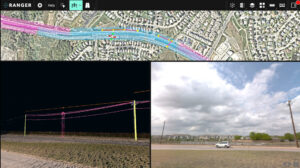
Ranger’s solution is a dual-visualization interface: every extractor works inside the colorized point cloud and the 360-degree panoramic imagery simultaneously. While extracting in the cloud, the panoramic images are referenced directly for the detail work. A quick zoom on the panoramic imagery can identify that pole attachment type buried in vegetation, or a difficult to see anchor in the grass. The imagery is the deciding factor in pole attachments close to the pole, and allows for better condition assessments or types of ground feature assets as well.
Semi-Automated Extraction at Production Speed
Even with great visualization, manually extracting every pole, span, midspan, and anchor across hundreds of directional miles is what blows make-ready timelines. Ranger’s semi-automated extraction tools are built to compress that work – keeping a human extractor in the loop for every attribution decision, but offloading the geometry detection and measurement work to the platform.
Poles
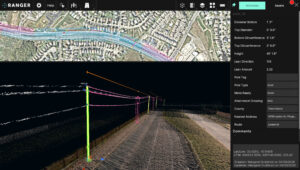
Aerial extraction starts with the pole assets. Extractors can select the pole with a simple click, and Ranger does the heavy lifting to identify the pole geometry. The top and bottom circumferences and diameters, lean direction, lean amount, and pole height are all automatically extracted.
Spans
Once poles have been extracted, the spans are a simple next step. The extractor can select two poles that are linked with lines, and select the “Span” tool. The Span tool automatically runs a span between the two poles and generates the span length. The span is linked to both pole IDs, which creates a connected network of data for quick analysis..
Pole Attachments
Correctly attributing the pole attachments is one of the most important steps of the aerial extraction. There are a few different ways to extract pole attachments. Users can extract the pole attachments with a simple click of a button, and the attachment height is generated automatically. Extractors can use a drop-down menu to choose the attachment type. Users can also extract pole attachments by automatically identifying them using the midspan tool, which auto-extracts all pole attachments and their midspans by selecting the two poles.
Midspans
Similarly to spans, the midspans can be automatically extracted by selecting two poles and running the “Midspan” tool. This tool will automatically identify all pole attachments with wires that run between the two poles, and it will follow the wire lines to correctly identify their midspan point and height.
Anchors
Anchors can be extracted with a quick click, and the lead distance to the base of the pole will be auto-extracted. Similarly to spans and midspans, anchors will be tied to their corresponding pole with the pole IDs.
Together, these tools let extractors move through a hub at the pace make-ready demands without sacrificing the per-asset detail engineering needs on the back end. Speed and technical depth – both at the same time.
Why It Works
Make-ready is fast and technical. Those two requirements pull in different directions, and most extraction platforms end up optimizing for one at the expense of the other – either speed with thin attribution, or rich attribution at a pace no make-ready schedule can absorb.
Ranger was built specifically to refuse that tradeoff. Hub-based project management absorbs schedule pressure. Multi-org collaboration absorbs capacity spikes. Customizable data dictionaries absorb the variability between client asset models and downstream CAD workflows. Dual visualization absorbs the ambiguity in attachment attribution. Semi-automated extraction absorbs the volume. None of those features are accidents – they are the direct product of running make-ready projects ourselves, in the field, and building the tools we wished we had.
The result is a make-ready workflow where speed and technical depth are not tradeoffs. They are the same workflow, running at the same time.
Interested in seeing how Ranger handles a make-ready project? Get in touch with the New Compass team.